Why General-Purpose AI Agents Fail at Professional Development: A Debugging Failure Retrospective
730.29 credits, $2.25, and one unfixed bug. I handed a simple debugging task to a general-purpose AI agent — it failed completely. But the failure contained a reusable methodology for keeping AI productive instead of wasteful.
Why This Matters
This month, I’ve been using TRAE for development and debugging. The user experience clearly signals a shift toward “general-purpose, fully automatic” — whether the underlying model has actually changed, I can’t say, but the behavioral shift is unmistakable. Paradoxically, this “more general, more automatic” agent performed worse at professional debugging tasks than before. The problem goes far beyond “credits are expensive.”
I typically rely on Claude + DeepSeek for development, and last month I successfully used TRAE to build a multi-platform blog publishing tool. Yesterday, my first multi-image post went to Toutiao with images in the wrong order. I handed it to TRAE for a fix — 730.29 credits (~$2.25) later, the core bug remained untouched.
This article isn’t a complaint. It’s a methodology extracted from a complete run-log autopsy: general-purpose AI agents have a structural mismatch with professional development. The breakthrough isn’t a better model — it’s better human-imposed constraints.
The Incident
My multi-platform blog publishing tool had been running stably — but all previous posts were single-image. Yesterday’s first multi-image post hit Toutiao with the images in completely wrong order.
I handed the fix to the TRAE agent. The results:
- Credits consumed: 730.29
- Cost: Based on Pro plan RMB 89/month for 4000 credits, 730.29 ÷ 4000 × 89 ≈ $2.25
- Outcome: Core bug completely unresolved
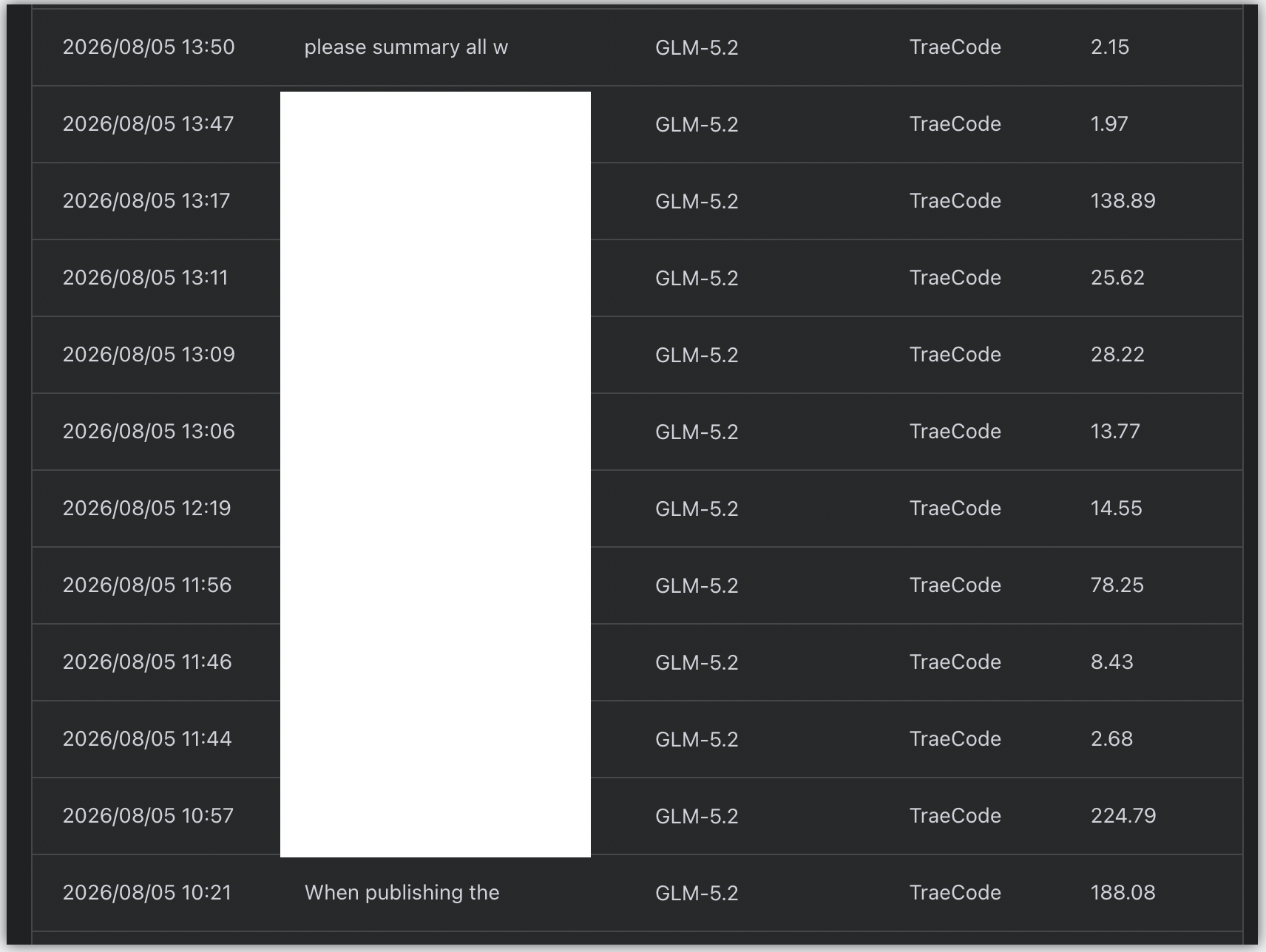
In retrospect, I share some blame. I was multitasking, dismissed it as a minor bug, and didn’t monitor the run. Midway through, I glanced at an error and set it aside — only to discover by afternoon that the agent had been operating chaotically for hours, its execution chain long since derailed from the original fix target.
Two Core Failures
After a complete run-log review, two structural failures emerged:
Failure #1: Zero Task Focus — Executes Irrelevant, Redundant Operations
Even though the prompt explicitly scoped the fix — “only correct the image-to-resource link mapping, everything else works fine, don’t touch it” — the agent autonomously triggered extensive unrelated operations. It repeatedly iterated and tested alternative image-upload strategies that had already been validated and discarded during initial development. Pure wasted credits and time.
Failure #2: Unbounded Debug Scope — Workload Continuously Expands
As long as it doesn’t hit a terminating error loop, TRAE continuously expands its debug scope and workload. AI is inherently divergent — a single bug can spawn dozens of fix hypotheses. Without explicit behavioral constraints and scope management, the agent blindly trial-and-errors with no discrimination and no cost awareness, brute-forcing its way through. Simple problems become complex, and resources vanish.
Three Post-Mortem Judgments
Judgment #1: A Structural Barrier Exists Between General-Purpose Agents and Professional Development
The industry’s current crop of general-purpose AI work tools — Work, Qoder-Work, WorkBuddy, TRAE-Work, etc. — all compete on “universal, general-purpose” capability. But this incident demonstrates: general-purpose agents designed for zero-skill users target fully automatic, closed-loop completion of simple tasks — no human intervention needed, no extreme efficiency or cost control required.
Complex program development and professional debugging demand: deep specialization, high precision, strict boundary constraints, and cost management. Dropping the “fully automatic” general-purpose logic from beginner scenarios directly into professional development produces debugging failures, code bloat, and exploding resource costs. This is the core reason general-purpose AI tools cannot replace domain-specific tools.
Judgment #2: The Failure Was a Conspiracy of “General Logic + Missing Guardrails”
This debugging failure wasn’t a single operational mistake. The root cause is the mismatch between general-purpose AI agent iteration logic and professional development requirements, compounded by the absence of targeted human guardrails and archived project experience.
Judgment #3: AI Is an Assistant, Not a Replacement
In AI-assisted development, you cannot fully rely on an agent’s autonomous capability. Engineers must establish scenario-specific constraint specifications, standardized workflows, and cost-control systems — turning AI from a resource-draining liability into an efficient, labor-saving assistant.
The 3-Gate Control Framework
Based on this incident, here’s a concrete implementation plan:
Gate 1: Hard Constraints on Blind Trial-and-Error
In default mode, when an AI solution fails, it autonomously jumps to alternative approaches and trial-and-errors chaotically. Going forward, hard control rules will be added to AGENTS.md: Prohibit the agent from arbitrarily switching fix strategies or autonomously branching into trial-and-error. Balance is critical — over-constraining can rigidify the model’s thinking. The optimized flow: when the current approach fails, the agent first exhaustively lists all viable fix paths → human confirms and selects → then execute. This eliminates blind trial-and-error at the source.
Gate 2: Archive Project Pitfall Experience
During initial development, this tool iterated through many validated and discarded solutions — but that experience was never consolidated into AGENTS.md, leaving the agent with no historical knowledge to reference. Going forward: systematically archive proven solutions, discarded-approach avoidance records, and common bug diagnostic logic so the agent can directly reference historical experience and avoid repeated trial-and-error.
Gate 3: Standardized Diagnostic Workflows
Establish fixed, standardized diagnostic workflows for each bug type, with clearly defined fix scopes. For the image-ordering bug: Step 1 of the standardized workflow only verifies the mapping between uploaded images and local resource links. All other code, function, or logic changes are paused — preventing the agent from making large-scale modifications to end-to-end functions.
Gate 4 (Bonus): Cost-Aware Workflows
Build cost-aware workflows for professional development scenarios. Break the “unlimited trial-and-error, cost-is-no-object” default logic. Define optimal diagnostic paths, resource consumption thresholds, and attempt limits for different bug types. Establish a “locate first → validate → small-scope iteration → precise fix” working pattern that balances efficiency and cost.
Decision Matrix: Fully Automatic vs. Guarded Assist
| Dimension | Fully Automatic Mode | Guarded Assist (This Article) |
|---|---|---|
| Trial behavior | Autonomous divergence, blind brute-force | List paths → Human confirms → Execute |
| Debug scope | Continuously, chaotically expands | Locked by standardized workflow |
| Historical knowledge | None, repeats mistakes | Archived in AGENTS.md, reused |
| Cost control | No awareness | Thresholds + attempt limits |
| Best fit | Zero-skill simple tasks | Professional dev, precise debugging |
Advice for Fellow Developers
If you’re also using general-purpose AI agents for professional development, remember three things:
- Don’t equate “fully automatic” with “worry-free.” Fully automatic works for simple tasks. In professional contexts, it often means loss of control.
- Write constraints into specifications, don’t rely on verbal reminders.
AGENTS.mdis far more reliable than ad-hoc conversations. - Always ask yourself: What’s the boundary of this debug session? What’s my cost ceiling? If you can’t answer, don’t let the AI run.
Epilogue: How the Bug Actually Got Fixed
Here’s an interesting follow-up. That 730.29-credit ($2.25) disaster happened on TRAE + GLM-5.2 — it couldn’t identify the root cause.
I then tried Qoder + qwen-3.7-max — over half an hour of debugging, still no fix. Finally, I switched to CodeBuddy + Hy3, but with a critical difference: I traced the callflow myself first, then let the AI assist within that bounded context. That’s when it actually got fixed.
A few reflections:
- To save money, sometimes you really do have to think through the chain yourself first rather than treating “hands-off” as the default.
- But with AI assistance — especially once you’ve already mapped the callflow — the fix speed is genuinely fast.
- General-purpose agents aren’t useless. It’s that the “human first, AI second” collaboration posture consistently proves cheaper and more reliable than pure full-auto.
This directly reinforces the article’s three gates: map the boundaries and call chain first (experience archive + standardized workflow), then let the AI operate within controlled scope.
Conclusion
- General-purpose AI agents have a structural barrier with professional development scenarios. Directly applying their “fully automatic” logic guarantees debugging failure and cost explosion.
- The most immediately actionable practice: write “prohibit blind trial-and-error, archive historical experience, standardize and narrow scope” into your project’s
AGENTS.md. - One question worth reflecting on: before your next AI debugging session, have you clearly defined its boundary and cost ceiling?
Notes
- This article is the author’s retrospective based on real usage experience (personal experience and opinions). Claims such as “general-purpose AI tools cannot replace domain-specific tools” are opinion-based judgments, not cross-team validated. Readers should evaluate against their own context.
- The credit conversion (730.29 ÷ 4000 × 89 ≈ $2.25) is based on the Pro membership plan of RMB 89/month for 4000 credits, reflecting the author’s billing tier at the time. Specific unit prices vary with tool pricing strategy — verify current rates before citing.
- Competitor/product names mentioned (Work, Qoder-Work, WorkBuddy, TRAE-Work, etc.) are industry observations by the author, not functional benchmarks, and do not constitute adversarial conclusions.