Get Pinged When Your AI Agent Needs You: A Feishu Webhook Best Practice (6 Options Compared)
You delegate a long task to your AI agent and walk away. Thirty minutes later you check in — and the run stalled at step 2. It needed a credential only you hold, a web login confirm, or a yes/no on something irreversible. The task isn’t broken. It just can’t reach you. This article gives a reusable fix: have the agent post an interactive card to a Feishu group at the moment it needs a human, and compares six China-friendly options so you can pick the right one.
Three things you’ll take away
- A selection rule — filter the six options on three axes: one-way / two-way, qualification barrier, network requirement.
- A key trade-off — the zero-friction group bot is one-way only; two-way means upgrading to a self-built app (long-connection version avoids a public server), at the cost of personal real-name + a personal org.
- An alerting best practice — a good alert = a title that says what to do + a background that says where it’s stuck + a copy-paste command.
When does a task actually need a human?
- A token or credential only you possess.
- An expired web session the headless browser can’t re-auth.
- An OAuth bind or authorization confirm.
- A go-ahead before an irreversible action — create a repo, ship, spend.
- An ambiguous requirement the agent won’t guess.
They’re not urgent enough to call, but wait an hour and the run is wasted. The alert channel must reach your phone instantly, be cheap to wire up, and — for a solo dev — not require a public server.
Six options compared
| Option | One-way | Two-way | Qualification | Free | Network |
|---|---|---|---|---|---|
| Feishu group custom bot | ✅ | ❌ | Normal Feishu account | ✅ | one-way only |
| Feishu self-built app | ✅ | ✅ | Personal real-name + personal org | ✅ | long-connect: no public net; webhook: needs public net |
| DingTalk group custom bot | ✅ | ❌ | Normal DingTalk account | ✅ | one-way only |
| DingTalk self-built app | ✅ | ✅ | Personal real-name enterprise | ✅ | two-way needs public callback |
| WeCom self-built app | ✅ | ✅ | Personal real-name enterprise | ✅ | two-way needs public callback |
| 3rd-party WeChat bot | ✅ | ✅ | Personal WeChat | ✅ | high ban risk; skip |
How to read it:
- One-way / two-way — need only “it pings me” → one-way is enough; replying to the agent in-chat is the only reason for two-way.
- Qualification — the group bot needs just a normal account; self-built apps generally require personal real-name (DingTalk / WeCom also want a real-name enterprise).
- Network — with no public server, only “one-way” and the “long-connection self-built app” stay免公网.
Why the Feishu group custom bot wins for solo devs
A normal Feishu account, zero real-name, zero org, zero business license. Create a group → add a custom bot → grab the webhook. Interactive cards are ideal for “background + action item.” Trade-offs: one-way only, and the webhook URL is the credential — leak it and anyone can post to your group.
Need two-way and no public server? The Feishu self-built app (long-connection version) is the only two-way option without a public endpoint — at the cost of personal real-name + a personal org. DingTalk / WeCom self-built apps fit once you have an enterprise entity and a public callback. The 3rd-party WeChat bot relies on unofficial protocols and risks bans; skip it.
How it works
- AI Agent — decides at a key branch whether a human is needed.
- Webhook — the group bot’s only entry point, one HTTPS POST.
- Interactive card — structures background and action item.
- You — get the push, run the command, the run continues.
AI Agent ──POST webhook──▶ Feishu group bot (one-way)
      ▲                      │ card push
      └──── you run command ─  Feishu app
Three invariants:
- Alert only when a human is truly needed; anything auto-retryable stays silent.
- Every alert carries an executable action — a command or link — so you can act in 30 seconds.
- Treat the webhook like a password: env var or config, never in the repo, enable signature verification if you can.
Setup: about half an hour
- Create a Feishu group (you alone is fine), name it like “AI task alerts”.
- Group settings → Group bots → add a custom bot, give it a recognizable name (e.g. DevAgent).
- Copy the webhook into an env var / local config; don’t commit it.
- Wire the “needs-human” branch of your task script to that webhook.
- Send a test message to verify the link.
- (Optional) enable signature verification to prevent webhook abuse.
The send side is one HTTPS POST:
curl -s -X POST "$FEISHU_WEBHOOK" \
  -H "Content-Type: application/json" \
  -d '{
    "msg_type": "interactive",
    "card": {
      "header": { "title": { "tag": "plain_text",
        "content": "Manual action required: <one line on what to do>" },
        "template": "orange" },
      "elements": [
        { "tag": "div", "text": { "tag": "lark_md",
          "content": "**Background**: <what is done, where stuck>\n**Action needed**:\n<copy-paste command or link>" } },
        { "tag": "hr" },
        { "tag": "note", "elements": [ { "tag": "plain_text",
          "content": "from <agent name> · <time>" } ] }
      ]
    }
  }'
What a good alert looks like
A real one I received: the agent stalled mirroring a repo because the Playwright web session had expired.
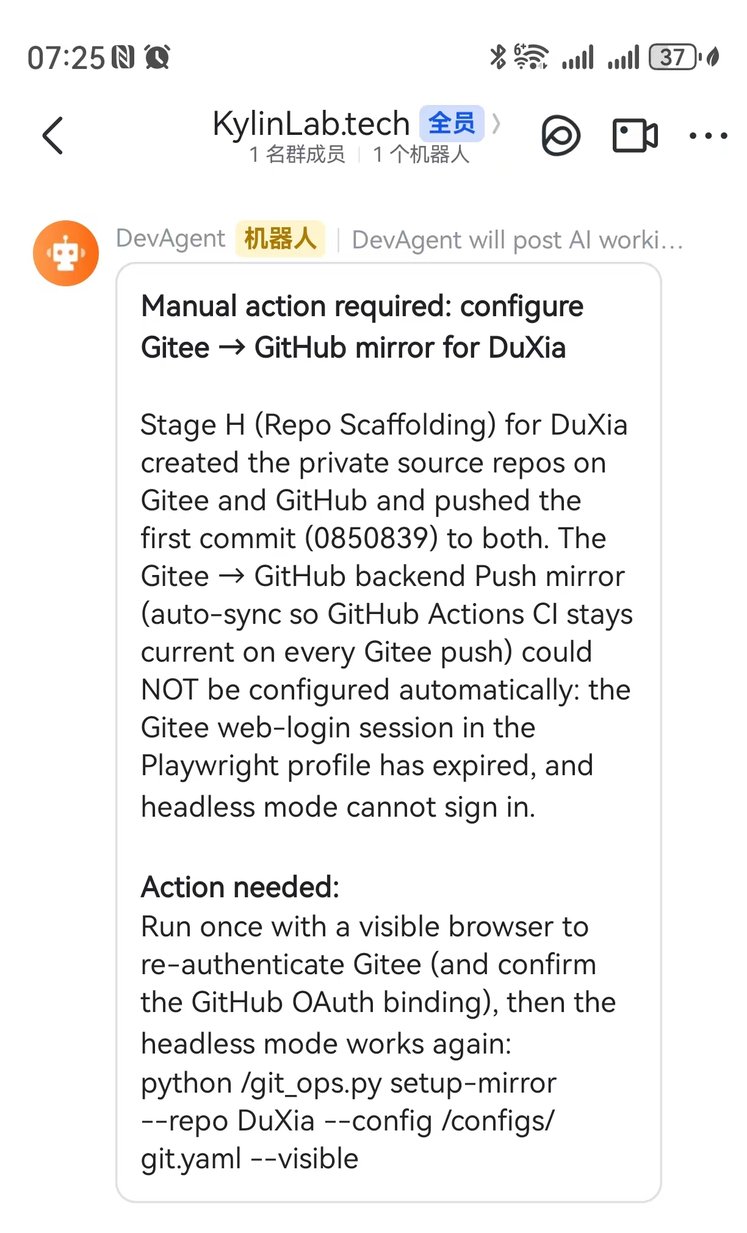
It did three things right: the title was the conclusion, the background pinpointed the blocker, and the action item was a full command. Contrast that with “task failed, see logs” — barely better than no alert.
Recommendation matrix
| If you need… | Choose… | Because… |
|---|---|---|
| Solo use, zero friction, today | Feishu group custom bot | no real-name/org/net; one POST to wire |
| Two-way and no public server | Feishu self-built app (long-connect) | only two-way option without a public net |
| Already on DingTalk, one-way | DingTalk group custom bot | same low friction |
| Enterprise entity + WeChat reach | WeCom self-built app | full two-way, good WeChat reach |
| — | Avoid 3rd-party WeChat bot | ban risk |
Summary
Ask yourself: do you want “it pings me,” or “I talk back to it”? Most solo developers need only the former — start with the lowest-friction bot. Wire the webhook behind the “needs-human” branch, and your phone will ring exactly when the agent is waiting on you.