Benchmarked 6 AI Coding Agent+Model Combos — ClaudeCode + DeepSeek-V4-Pro Wins
The invoice arrived on a Tuesday like any other, and that’s when I finally felt the difference.
At my previous corporate job, AI coding tools were a background detail — GitHub Copilot Business on every seat, Claude Opus API keys in the team vault, Codex endpoints wired into our CI pipeline. The combined per-seat cost was definitely north of $50 a month. I’d never once looked at the actual bill. It wasn’t my money.
Then I went indie. I moved my entire operation to mainland China, where I live. And I got my first real invoice for AI coding tools that I was paying for.
This is the story of what happened when I stopped treating AI coding as a company expense and started treating it like the indie-founder tool budget it actually is. I benchmarked six complete agent-client + language-model setups on a real project for an entire calendar month. I kept everything else as controlled as I could: same codebase, same feature roadmap, same three weighted scoring dimensions.
One setup won, and it wasn’t even close. The numbers surprised me so much I ran the invoice twice to make sure I hadn’t misread it.
Then, in extended follow-up testing to ship the first version of this write-up, I hit a genuinely nasty stability bug in one of the subscription clients — TRAE on macOS randomly exits the entire application with no crash report, no system logs, no stack trace anywhere. Entire conversation context wiped each time. I’ve included that new finding too, because it completely changed my recommendation for anyone considering a long subscription.
The cheapest setup was also, by a clear margin, the best one. And the worst bug I found had zero diagnostics available to debug it.
The Two Constraints That Changed Everything
Before we get into the benchmark itself, let me explain the two forces that made “just keep using Copilot + Opus” a non-option. If you’re reading this from San Francisco or Berlin with a US-registered Stripe account, these won’t apply to you — skip ahead to the results. If you’re anywhere near the Asia-Pacific region, especially operating from inside mainland China, you already know exactly what I’m talking about.
Constraint 1: Network geography.
Reliable, low-friction access to Western model APIs from mainland China is an engineering problem in its own right. The naive solutions are insecure (proxies you don’t control); the proper ones add 40–60% to your effective monthly cost and introduce latency that you can feel during agent multi-step task chains. For a company, this is a corporate IT problem. For me, it was a “why am I making my own work harder” problem.
Constraint 2: It’s actually my money now.
I know this sounds obvious until you feel it. A $49/month SaaS stops being “background cost” and starts being “that’s two nice dinners out” or “that’s a year of my domain name registered in advance” real fast. Every line item matters when the runway is measured in your own savings.
So I built a benchmark. Six setups, one project, one month. Let’s go.
The Benchmark Design
I picked three weighted dimensions and scored every setup against them:
| Dimension | Weight | What it actually measures |
|---|---|---|
| Task completion rate | 40% | Did the same set of feature-development tasks actually get done, end to end? |
| Stability | 35% | No random hangs, no silent context loss, no scheduler meltdowns mid-chain, no crash exits with no logs |
| Client/model freedom | 25% | Can I change models in 30 seconds? Change clients? Use non-whitelist models? |
I tested six complete setups:
| ID | Agent Client | Paired Model | Payment Model |
|---|---|---|---|
| A | ClaudeCode (VS Code extension) | DeepSeek-V4-Pro | Pay-as-you-go tokens (I paid real money) |
| B | OpenCode | Qwen-3.7-Plus | Universal API key (free tier tested) |
| C | CodeBuddy | glm-5.2 (whitelist-optional) | Client subscription (free tier tested) |
| D | Qoder | Qwen-3.7-Plus (whitelist-optional) | Client subscription (free tier tested) |
| E | TRAE | Doubao-internal (seeded, suspected Seed-2.0-Code) | Platform subscription (free tier tested) |
| F | ClaudeCode (same VS Code extension) | Kimi-2.7-code | Pay-as-you-go tokens (I paid real money) |
Two important notes on methodology:
- Setups A and F I ran on real, paid tokens — I wanted apples-to-apples on cost.
- Setups B, C, D, and E I ran on the best free tier / trial plan each offered. Where free-tier throttling might skew results (notably, TRAE’s speed and OpenCode’s latency), I flag it explicitly. I don’t think it changes the final rankings meaningfully, but I want to be transparent.
The Results, Ranked (With a New Downgrade for TRAE)
Here’s the final weighted scoreboard:
| Rank | ID | Setup | Completion (40%) | Stability (35%) | Freedom (25%) | Weighted Total |
|---|---|---|---|---|---|---|
| 🥇 1 | A | ClaudeCode + DeepSeek-V4-Pro | 10/10 | 10/10 | 10/10* | 10.0 / 10* |
| 🥈 =2 | B | OpenCode + Qwen-3.7-Plus | 9/10 | 8/10 | 10/10 | 8.15 / 10 |
| 🥈 =2 | C | CodeBuddy + glm-5.2 | 9/10 | 9/10 | 4/10 | 7.45 / 10 |
| 🥉 3 | D | Qoder + Qwen-3.7-Plus | 8/10 | 3/10 | 4/10 | 5.25 / 10 |
| 4 | E | TRAE + Doubao-internal | 7/10 | 2/10 ⬇️ | 1/10 | 4.15 / 10 |
| 5 | F | ClaudeCode + Kimi-2.7-code | 3/10 | 4/10 | 10/10 | 5.3 / 10 |
Why TRAE dropped (this is the new finding): Originally TRAE sat at a 6/10 stability and 5.2 total — docked for the pre-July-1 test-state issue: model-lock-in greyed-out lists (add to Settings, shown grey, couldn’t click — forced Auto only, a TRAE-unique flaw) and slow free-tier speed, but still “basically usable.” After extended daily-driver use on macOS, I started hitting a much worse problem: the app would randomly exit completely, no error prompt, no macOS crash report. I dug through Console.app for crash logs, searched ~/Library/Logs/DiagnosticReports for any timestamp match, checked ~/Library/Application Support/ for any TRAE-local crash dump directories. Nothing. Nada. Each exit completely wiped my in-progress conversation context, which is way more damaging than Qoder’s hang pattern (context survives the hang). I had to downgrade TRAE’s stability score all the way to 2/10. I don’t know if this is a free-tier-only bug, a specific macOS version issue, or something broader — but if you’re evaluating TRAE on Mac, do NOT annual-prepay under any circumstances until this is confirmed fixed.
A few things jumped out at me immediately.
🥇 Setup A — the unanimous winner.
ClaudeCode as a VS Code extension + DeepSeek-V4-Pro, paid per token.
This was the only setup that scored a full ten out of ten on every single dimension. I actually built the project’s initial scaffolding and first three releases on this setup exclusively, and it never once let me down.
The part that’s still hard for me to believe is the cost. Here’s the actual screenshot from my DeepSeek dashboard at the end of the billing period:
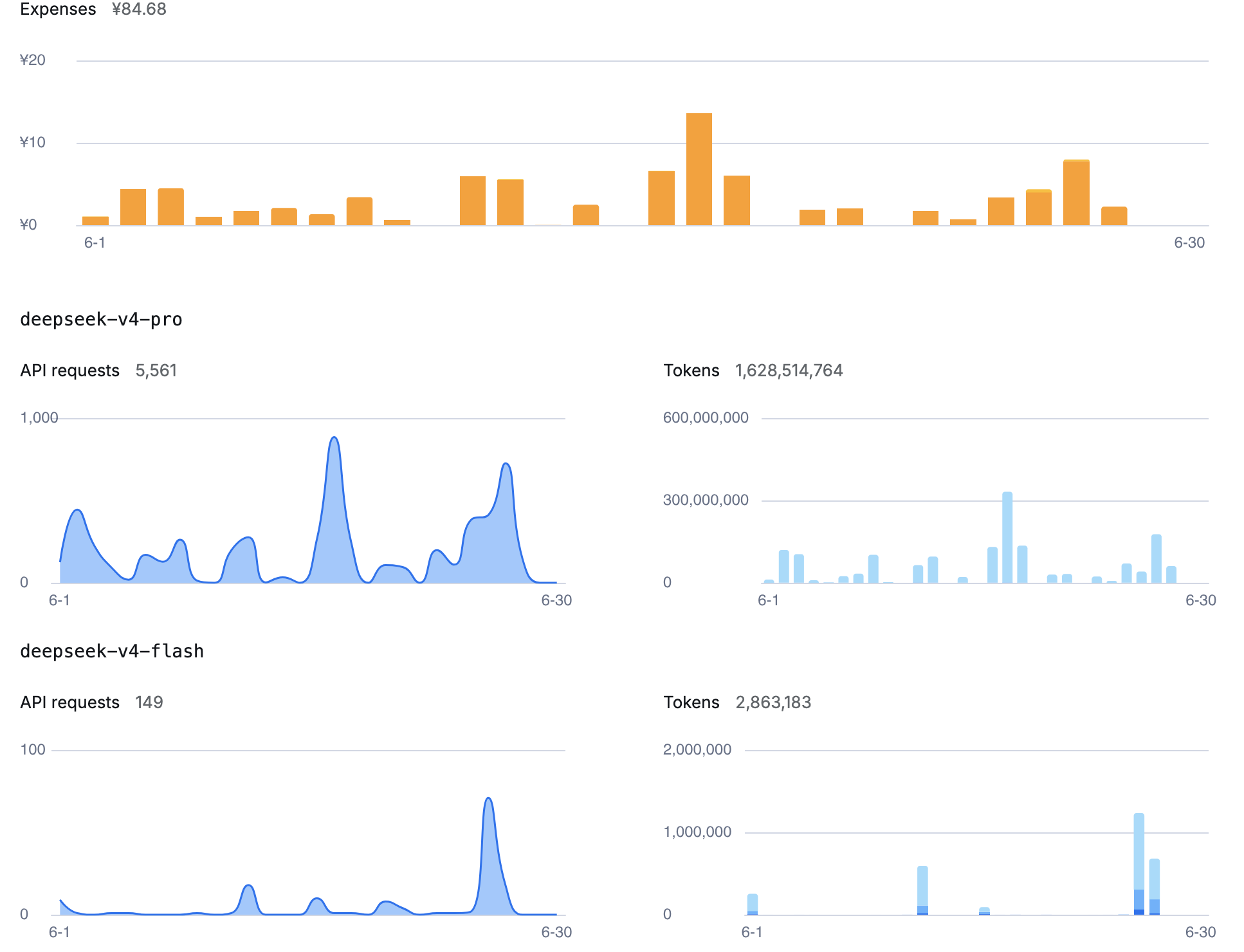
Five thousand, five hundred and sixty-one API requests.
1.628 billion tokens processed, input and output combined.
Total cost under pre-July-15 uniform flat-rate pricing: ¥84.68 Chinese yuan. That’s $11.60 USD, give or take a few pennies on the exchange rate.
For a full month of actual, real, serious software development on my indie SaaS product.
That’s less than a single moderately nice dinner in a tier-1 city. It’s one and a half weeks of coffee. For an entire month of AI coding assistance that, subjectively, I cannot tell the difference from my old $50+/seat corporate setup — under pre-July-15 uniform pricing.
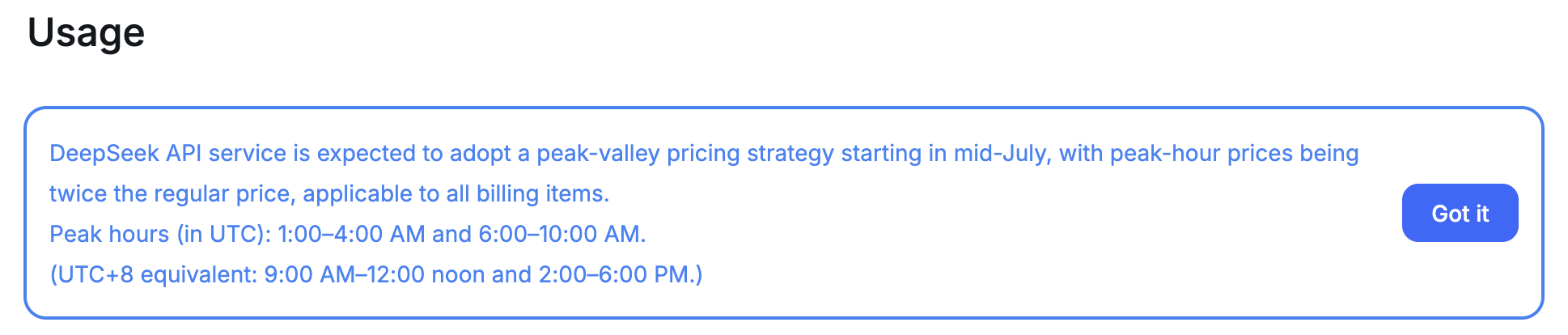
⚠️ IMPORTANT PRICING UPDATE (July 2, 2026): DeepSeek peak-hour surcharge incoming — timeline, math, and how to hedge. ⚠️
The ¥84.68 / $11.60 headline bill above (1.628B tokens / 5,561 requests) was generated under uniform flat-rate pricing valid before July 15, 2026. Zero peak/off-peak differential existed in that era, which is why the per-token cost was so ultra-low.
DeepSeek officially announced that effective July 15, 2026, a peak-hour surcharge mechanism activates. All API tokens (input + output) will be billed at base price × 2 during peak windows; off-peak hours stay at the original base price. In Chinese: 高峰时段单价翻倍.
Doing the upper-bound math: re-running the exact same 1.628B-token workload entirely during peak hours post-7/15 would land at a theoretical cost of approximately $23.20 / ¥169.36 (≈¥84.68 × 2). The practical way to stay near the original low level: schedule or shift your DeepSeek workload to off-peak windows.
The single biggest hedge against this kind of pricing change is universal pay-as-you-go client + model independence. If DeepSeek peak-hour bills become too expensive for your workflow, you can flip the same universal client (ClaudeCode, OpenCode) configuration to other same-tier pay-as-you-go models like Qwen / Kimi with zero client churn and zero sunk cost. Subscription clients cannot do this — you either swallow the peak-hour cost increase or eat the remainder of your subscription term.
Setup F — the cautionary tale.
What I find fascinating about Kimi is that it’s the same agent as setup A — ClaudeCode, identical VS Code extension, identical settings. Literally all I changed was the model API key in the config pane.
And the difference in behavior was night and day. Multi-step coding tasks entered infinite loops. The agent would rewrite the same file four times in a row, detect that nothing had changed, rewrite it again. Every time I killed the loop and restarted, the token counter was already inflated by retries. Same ClaudeCode, completely different outcomes.
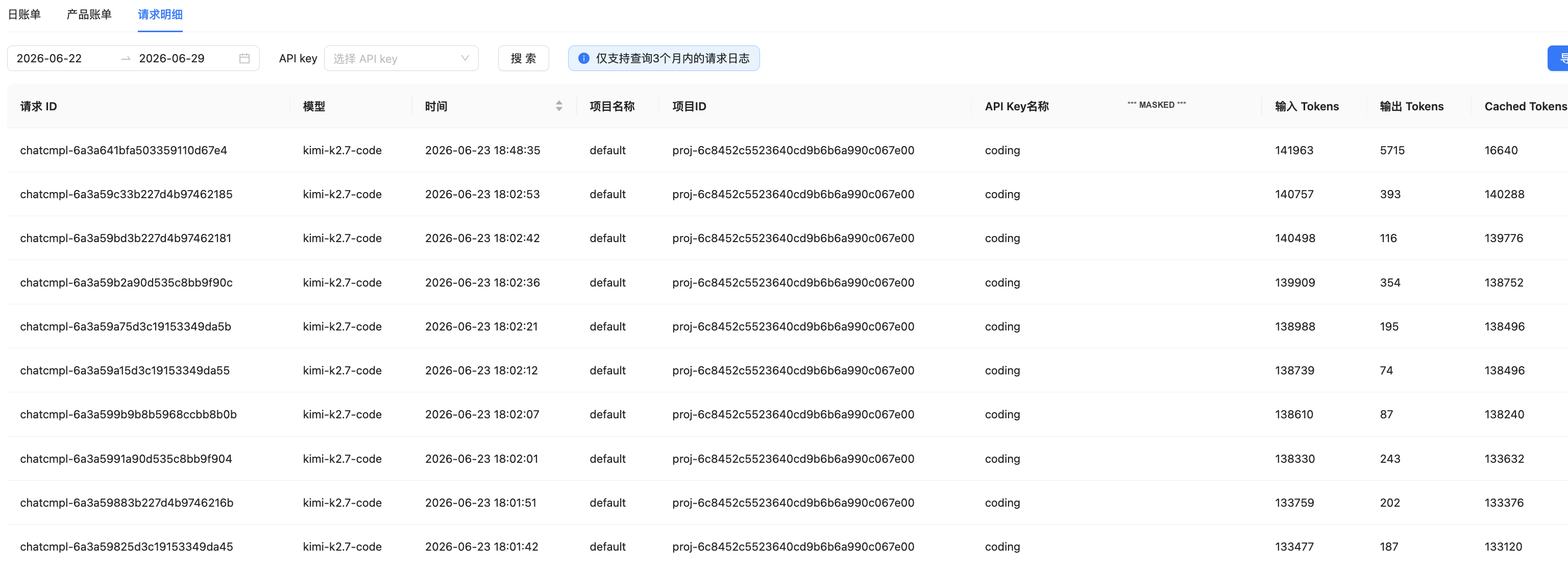

The raw token-per-dollar rate on paper doesn’t look that different from DeepSeek’s. In practice, the model’s behavior on agentic coding tasks meant I was burning 1.5–2× the tokens for zero successful task completion. Terrible value. Don’t use this model for multi-step coding agents in its current version.
Setup C — the best of the subscription bunch.
CodeBuddy paired with glm-5.2 was genuinely solid. No infinite loops, no random hangs, clean code reasoning. If subscription-based clients were the answer, this would be my pick.
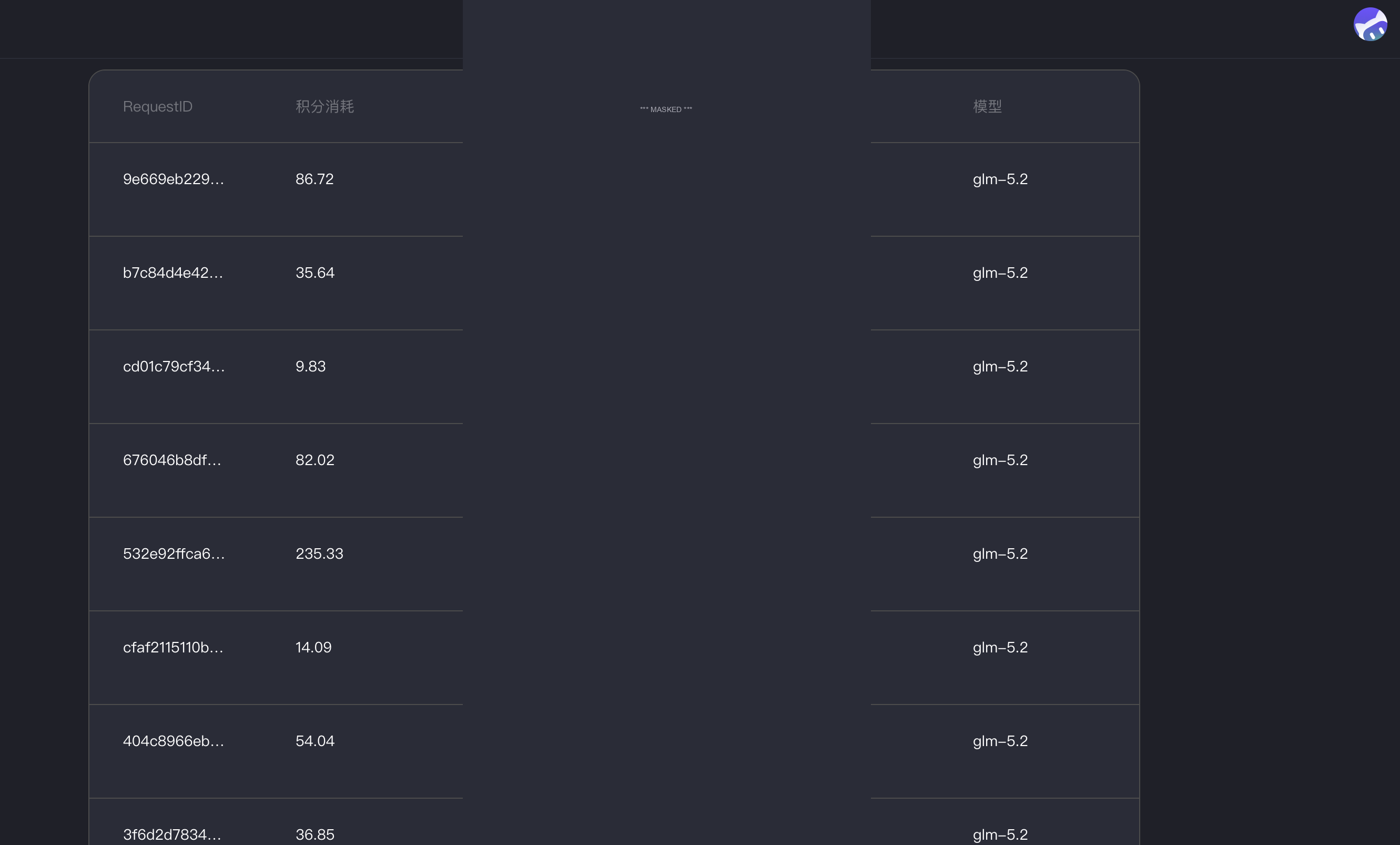
But even the best subscription setup has a structural problem that no amount of model quality can fix. We’re about to get to that.
Setup D — the weird, interesting middle case.
Qoder had one superpower: tasks that Kimi (setup F) could never finish did finish on Qoder with the same underlying Qwen model family. So the agent client’s orchestration logic genuinely matters. But Qoder also had the single worst stability issue in the entire benchmark before the TRAE crash finding: completely random hangs with no error output, no logs, nothing to debug. You’d just be sitting there, twenty minutes into a deep coding flow, and you’d realize the agent had stopped responding two minutes ago. Devastating.
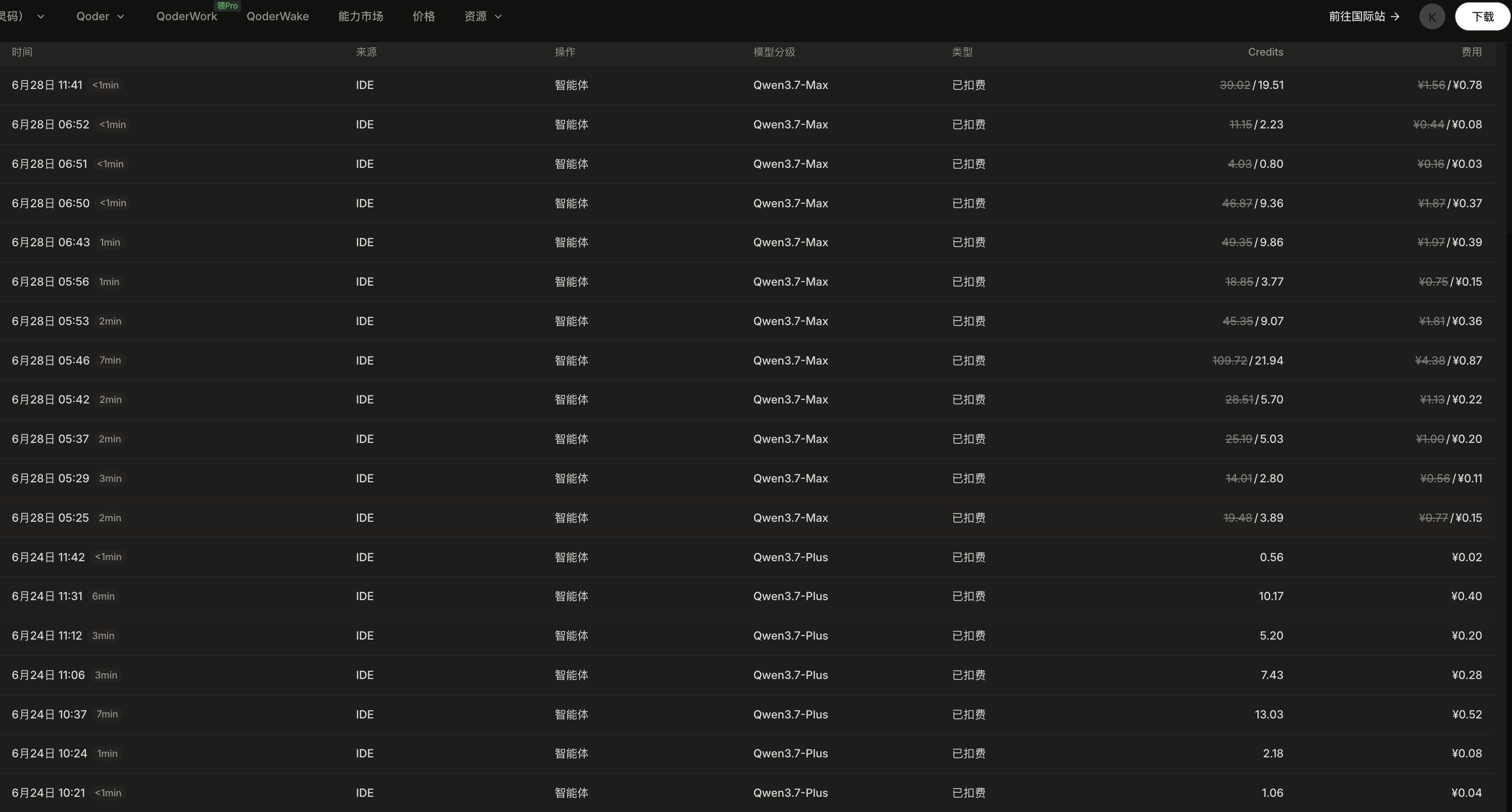
Setup E — the trap.
TRAE’s onboarding is genuinely beautiful. Zero config, model is there, agent works immediately out of the box. You start coding and you think “wow, this is it, why did I even bother benchmarking.”
Then you hit the wall. During my pre-July-1 test window, TRAE’s UI showed only Auto mode. TRAE let you add other models to its model list in the settings UI. But every single one you add showed up greyed-out and completely unselectable. The UI lied to you about having choice. You could look at the other models. You could not actually use them. It was a one-platform railroad, and you were on it. This was TRAE-unique — worse than Qoder/CodeBuddy, which at least let you click models.
And now, after extended testing, you add the macOS crash finding to that pile: random exits, no logs, context wiped each time. I genuinely don’t know how this ships on a desktop app in 2026 without some kind of crash-capture framework producing a diagnostics file somewhere. It’s the worst kind of user-facing bug: the one you can’t even begin to investigate from the user side.
⚠️ Publish-day update (July 1, 2026): Literally the same day this write-up ships, TRAE’s UI silently gained an Auto ↔ explicit mode toggle. With explicit mode turned ON, the exact same previously-greyed-out list items NOW become clickable and a specific model CAN be selected. The major TRAE-unique model-lock flaw that anchored my 1-month rating was quietly lifted on publish day. Interesting, almost funny timing. So as of July 1, the TRAE-unique forced-Auto lock is GONE — TRAE now sits in the same model-freedom class as Qoder/CodeBuddy. What remains locked for TRAE is only the standard subscription-client downside shared with Qoder/CodeBuddy: whitelist-outer models (e.g. GPT-5.5) are either unsupported or require out-of-pocket API-token billing on top of the client sub. The macOS random-crash-with-no-crash-logs bug, however, is still present as of July 1.
The Thing Nobody Tells You About AI Coding Tools: It’s Not About the Model.
By the end of the benchmark, I thought I’d write an article about the specific models. “DeepSeek-V4-Pro is good, Kimi-2.7-code is bad for coding, here’s the spread.”
Then I re-read the spreadsheet and realized the actual pattern wasn’t in the rows at all. It was in the columns.
The decisive split wasn’t “which model.” It was “which payment model.”
Every single setup in the top three (A, B, C) — wait, no. Let me be more precise. The two setups with perfect freedom scores (A and B) both use the same economic model:
A universal, model-agnostic agent client (ClaudeCode, OpenCode) plus a standard API key connecting to the model of your choice, billed per token on the model provider’s own platform.
The lower three setups (C, D, E) all use:
An agent client that you subscribe to directly, which ships with a whitelist of approved models inside its own ecosystem.
This split matters more than any individual model’s benchmark score. There are three reasons, and every single one of them only becomes obvious once you’re both (a) an indie developer writing code and (b) building a product that uses AI features itself.
Pay-as-you-go tokens with a universal client beat whitelist-model subscriptions for indie devs on every axis that actually matters. Period. Full stop.*
*Asterisk caveat (July 2, 2026): model-provider pricing changes (such as DeepSeek’s July 15 peak-hour ×2 surcharge) can narrow the raw-cost gap in aggregate. The pay-as-you-go architecture still wins decisively on optionality — see the pricing update block above for the model-flip hedge.
Reason one: the whitelist double-bind.
Client-subscription tools (CodeBuddy, Qoder, TRAE, and for that matter most of their Western equivalents) operate a whitelist model. The client ships with a list of models its operator has decided you can use. If the exact model you want — GPT-5.5, some boutique open-weight fine-tune, the next hot domestic Chinese startup that just dropped a benchmark leader — isn’t on the whitelist, you have two options.
Option one: wait. It might get added. It might not. You have zero leverage.
Option two: pay for access to that model separately via its API, on top of the client subscription you’re already paying. The same work, billed twice.
With the universal-client model? Swap the API endpoint. Paste in a new key. Thirty seconds of clicking in a settings panel, and you’re coding against literally any model provider that speaks the industry-standard OpenAI-compatible REST API. Which is, at this point, all of them.
Reason two: if your product has AI features, subscriptions double-bill you.
This is the big one for me, and the point I haven’t seen anyone else write about.
I’m not just using AI to write my product. I’m building AI features into my product: smart summarization, assisted translation, contextual suggestions. That means somewhere in my app’s backend, there’s an API call to an LLM provider.
With the universal-client + API-key setup? That same DeepSeek account balance pays for both.
- Coding agent doing refactoring? → deducts from same balance.
- In-app user requesting a summary? → deducts from same balance.
- One API key. One bill. No duplicated spend.
With a client-subscription setup? The client’s subscription tokens are locked inside the client’s own app. They literally cannot be used to power my backend. So I’m paying the same model provider twice for the same underlying compute: once through the client subscription, once through my backend API account. Pure waste.
Reason three: the agent client market is not done cooking, and bugs like TRAE’s zero-log crash happen in public.
In the first half of 2026 alone, the number of credible agent clients I could name has gone from “maybe two” to “half a dozen, all with real strengths.” This market is evolving quickly. New clients launch with better orchestration, better context handling, better UX every month.
If you’re on a subscription client, especially if you paid annually (the default upsell in every SaaS app), changing clients means eating the sunk cost of the subscription you haven’t used yet. You’re incentivized to stay on a worse tool because you prepaid it. And as the TRAE crash finding just demonstrated — that prepayment can turn into a pure sunk cost the moment a zero-diagnostics stability bug ships.
If you’re on a universal client + API key? Your tokens live at the model provider, not the client. Switch from ClaudeCode to OpenCode next Tuesday afternoon? Zero cents lost. The same balance just routes through a different client.
That freedom is worth more than any marginal one-click onboarding convenience, in my book.
What I’m Actually Using Now, and What I’d Recommend
For any indie developer or small-team operator based in mainland China today, the answer is unambiguous:
Start with ClaudeCode (VS Code extension) + DeepSeek-V4-Pro on the pay-as-you-go token plan.
Keep OpenCode + Qwen-3.7-Plus configured as your instant fallback plan (same API key architecture, literally a different extension).
Ignore the subscription-based clients unless you have a very specific feature they offer that you can’t live without.
I kept waiting for the other shoe to drop — for there to be a catch that justified going back to the more expensive setup. After a full production month, it simply never arrived. The code is good. The agent is stable. The cost is effectively zero (under pre-July-15 uniform pricing; schedule off-peak post-7/15 or flip to Qwen/Kimi inside the same universal client to keep it there). And the architecture keeps every future option open. The biggest upside of this pay-as-you-go setup as of July 2, 2026? When DeepSeek’s July 15 peak-hour ×2 surcharge kicks in, you’re not locked — swap to Qwen or Kimi in ClaudeCode/OpenCode in 30 seconds with zero client churn and zero sunk cost, something subscription clients simply cannot offer.
⚠️ Strong TRAE warning added in this revision: If you’re testing TRAE on macOS right now, month-to-month only. Do NOT under any circumstances lock in an annual or multi-month plan until the random-exit-no-crash-log bug is confirmed resolved and a crash-reporting pipeline is verified working. I have never shipped a desktop app that didn’t catch its own crashes and produce a log file somewhere; neither should you accept that from a tool you’re paying to use.
The most underrated superpower for an indie founder is optionality. A setup you can change on a Tuesday, without asking anyone’s permission and without losing money, is a setup that will serve you well for a long time.
If you’ve run your own benchmarks for a mainland-China-friendly setup, drop your combo in the comments. Subscribe via RSS for the next post in this series — it’s on project management toolchains for solo devs.