GitHub Actions Quota Management: From Quota Exhaustion to Compliant CI/CD
Indie developers dread a specific email: the GitHub Actions quota overflow notification. One click and your entire CI/CD pipeline locks up. This article breaks down the quota rules, shares a proven management strategy, and shows how to bake compliance into AI-generated workflows.
If you’re using GitHub Actions for private repos, you’ve probably been there: everything runs smoothly until one day you receive a quota overflow email, and all pipelines grind to a halt.
GitHub-hosted runners offer free quotas for private repositories with two hard constraints: 2,000 minutes of runtime per month and 500MB of artifact storage. My initial workflows had no storage management logic. Within a week, I hit the storage quota error (see below), exhausting the entire month’s allocation and locking my CI/CD pipeline until the next billing cycle reset.
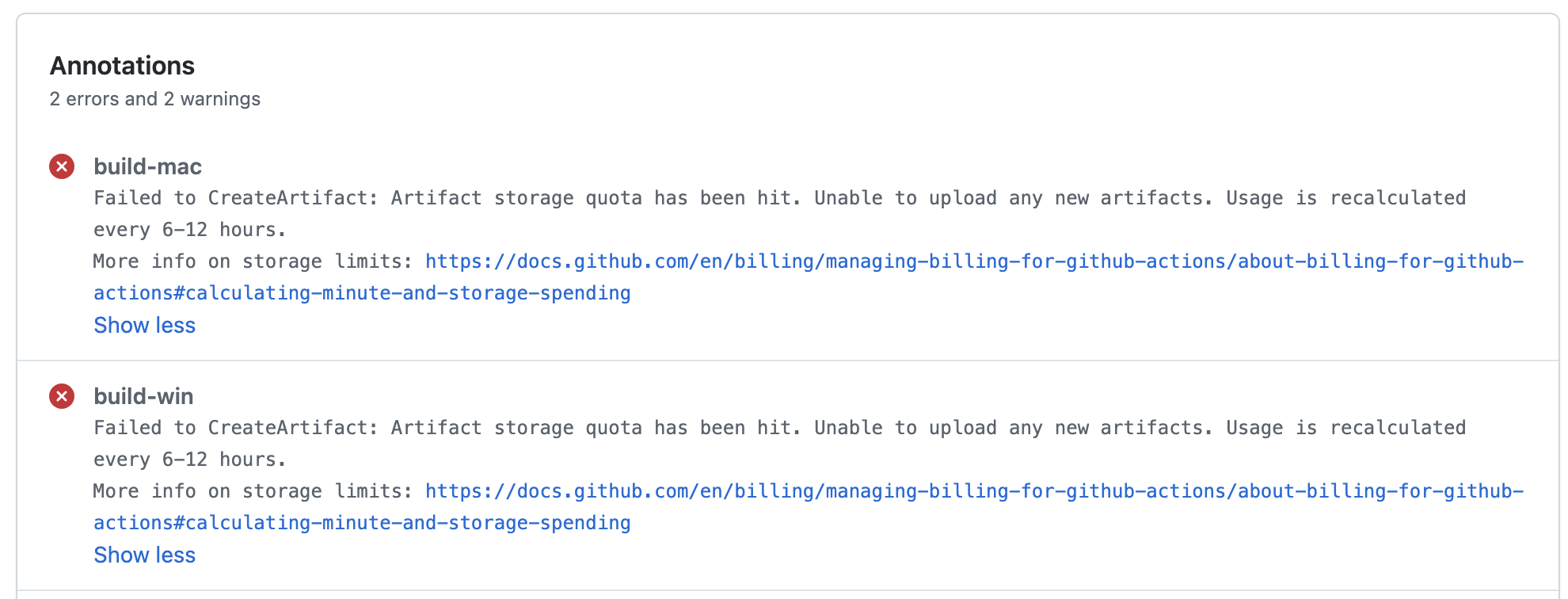
This article breaks down both quotas, shares a battle-tested management approach, and shows how to embed these rules into AI workflow generation — making “quota exhausted” a thing of the past.
Understanding Quota Rules as Design Constraints
Understanding GitHub Actions’ runtime and storage billing model is the prerequisite for writing workflows that never exceed their limits.
Runtime Quota
GitHub tracks actual wall-clock time on cloud-hosted machines. Different operating systems have different multiplier rates:
| OS | Multiplier | Notes |
|---|---|---|
| Linux | 1x | Standard consumption |
| Windows | 2x | Double deduction for same duration |
| macOS | 10x | Extremely high consumption, use sparingly |
Runtime minutes reset at the start of each month. Frequent use of macOS runners will exhaust the free quota rapidly.
Storage Quota
Storage isn’t a simple “500MB and done” cap. GitHub uses a GB-Hour billing model:
Formula: storage consumed × retention duration
Free tier equivalent: 0.5 GB × 30 days × 24 hours = 360 GB-Hour/month
Artifacts default to 90-day retention. A 100MB build artifact left uncleaned will consume storage quota for 90 days. Multiple build versions accumulate quickly, pushing your quota over the limit.
Key trap: Since the quota is billed on a GB-Hour cumulative model, deleting existing artifacts after hitting the limit does NOT free up already-consumed quota. The quota only resets at the next monthly billing cycle. Deletion only prevents further consumption — it cannot recover what’s already been used.
The Management Strategy: Three Key Constraints for Workflow Design
1. Immediate Cleanup + Safety Net Cleanup
Per-pipeline level: Clean up temporary artifacts immediately after each run. Add cleanup steps after actions/upload-artifact in your workflow, or use if: always() to ensure cleanup runs even on failure.
Safety net level: Deploy a scheduled cleanup workflow that runs daily, purging expired artifacts and orphaned archive resources. This catches garbage left behind by interrupted jobs.
2. Set Sensible Artifact Retention Periods
Configure the retention-days parameter when uploading artifacts to reduce storage footprint at the source:
- uses: actions/upload-artifact@v4
  with:
    name: release-build
    path: ./build/
    retention-days: 1
Reducing the default 90-day retention to 1 day cuts storage consumption by 99%.
3. Strategic Cache Trade-offs
Cache only core project dependencies (e.g., node_modules, ~/.cache/pip, ~/.m2). Removing cache entirely keeps builds functional but significantly increases build time, rapidly consuming your runtime quota.
The key trade-off: build efficiency vs. runtime quota consumption. Strategic caching reduces build time by 50-70%, and cache storage doesn’t count toward your quota (Cache and Artifact are separate storage pools).
The Optimization: A Three-Pronged Approach
Approach 1: Workflow Writing Constraint Checklist
Create a standardized constraint checklist as the specification for AI-generated workflow configurations:
Constraint Checklist (Core Rules):
1. Every upload-artifact step must specify retention-days ≤ 1
2. Every pipeline must include an artifact cleanup step at the end
3. Cache only core dependencies, scope precisely to lockfile
4. Avoid running non-essential tasks on macOS runners
5. Build output paths must use temporary directories
AI must strictly follow these rules — no unrestricted free-form generation.
Approach 2: Scheduled Cleanup Workflow
Deploy a dedicated scheduled cleanup workflow using GitHub Actions’ built-in actions/delete-artifact or the GitHub API:
name: Cleanup Old Artifacts
on:
  schedule:
    - cron: '0 6 * * *'  # Daily at 6:00 UTC

jobs:
  cleanup:
    runs-on: ubuntu-latest
    steps:
      - name: Delete artifacts older than 1 day
        uses: actions/github-script@v7
        with:
          script: |
            const { data: artifacts } = await github.rest.actions.listArtifactsForRepo({
              owner: context.repo.owner,
              repo: context.repo.repo,
            });
            const now = Date.now();
            const cutoff = 1 * 24 * 60 * 60 * 1000;
            for (const artifact of artifacts.artifacts) {
              if (now - new Date(artifact.created_at).getTime() > cutoff) {
                await github.rest.actions.deleteArtifact({
                  owner: context.repo.owner,
                  repo: context.repo.repo,
                  artifact_id: artifact.id,
                });
              }
            }
Approach 3: Package as an AI Skill
Bundle the constraint checklist and cleanup workflow into a standalone AI skill. All future projects can invoke this skill to generate compliant workflow configurations. Even team members unfamiliar with quota details will produce compliant configurations.
Alternative: Self-Hosted Runners
Deploying local self-hosted runners completely bypasses GitHub’s runtime and storage limits. However, for individual developers, setting up and maintaining heterogeneous environments (Linux, Windows, macOS) is costly and offers poor daily ROI.
Decision framework:
- Small teams / personal projects → Free tier + management is sufficient
- Medium-large teams / frequent builds → Self-hosted runners offer better value
- Need macOS builds → Self-hosted is almost mandatory (public macOS runners are extremely expensive)
Results and Benefits
After implementing the management approach described above:
- Storage quota completely resolved — daily cleanup + short retention keeps monthly consumption stable at under 200 GB-Hour
- No more quota alerts — pipelines run continuously without interruption
- Controllable runtime consumption — strategic caching cut build times by 60%, keeping runtime quota usage under 50%
- Zero-cost operation — running entirely within free tier, no paid plan upgrade needed
Reusable Checklist
- All
upload-artifactsteps setretention-days: ≤ 1 - Pipeline ends with
if: always()artifact cleanup step - Daily scheduled cleanup workflow configured
- Cache scoped to lockfile, core dependencies only
- macOS runner usage minimized
- Constraint checklist packaged as AI skill for workflow generation
Summary
- GitHub Actions free tier is sufficient for personal projects, but storage quota requires active management.
- Artifact retention strategy + scheduled cleanup + strategic caching form a complete quota management system.
- Embedding rules as a constraint checklist in AI generation is the lowest-cost path to long-term compliance.
If you’re using GitHub Actions for CI/CD, start with today’s cleanup workflow. Spend 10 minutes deploying a scheduled cleanup task, and you’ll never face the embarrassment of a quota-locked pipeline again.
Full configurations live in the GitHub repository. Next up: GitHub Actions Cache Strategy Deep Dive — subscribe via RSS so you don’t miss it.
Did I miss a gotcha with GitHub Actions quota management? Let me know in the comments below.