TL;DR
TRAE (ByteDance’s AI-powered IDE — Integrated Development Environment) switched from speed-pass count deduction to credit-based billing. As a paying TRAE Pro subscriber, this prompted a full re-evaluation of my AI coding tool stack. The real hidden cost in AI tools isn’t the headline price — it’s billing model changes. No single tool wins all dimensions, and a combo approach (DeepSeek for code plus a complementary tool for multimodal) is more resilient than betting on one tool.
The Billing Change
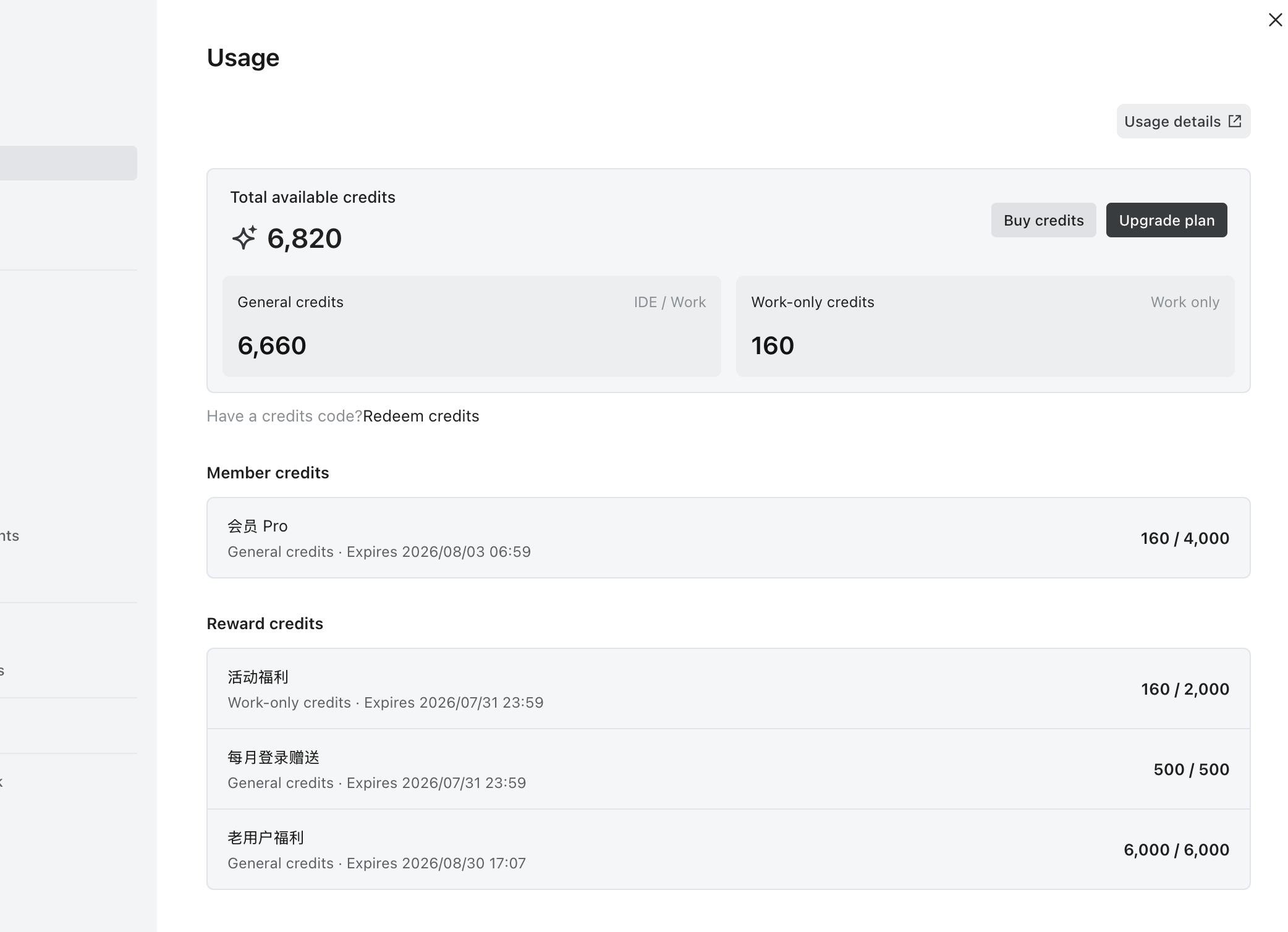
TRAE notified users that its billing model is shifting from a speed-pass count system to credit-based billing. The new credit interface shows 6,820 total credits, split into general credits (usable across IDE and Work) and work-only credits. These credits come from multiple sources — Pro membership, event rewards, monthly login bonus, and loyalty rewards — each with its own expiration date.
This isn’t surprising. Metered billing is the industry trend as compute costs make “unlimited” promises unsustainable. But as a paying TRAE Pro subscriber at 59 RMB per month, the real question is: does the value proposition still hold after the billing change?
Three Key Judgments
1. Billing Model Changes Are the Hidden Cost Risk
Billing model changes represent a hidden cost risk in AI tools that’s more important than headline prices. Today’s best-value tool can become expensive tomorrow with a single rule change.
TRAE switched from speed-pass counts to credits. DeepSeek introduced peak-hour price doubling in July. The monthly cost you calculated today can be invalidated by one announcement tomorrow.
When choosing tools, evaluate not just “how much does it cost now” but “can the billing model suddenly change, and can I switch quickly if it does?”
2. No Single Tool Wins All Dimensions
DeepSeek offers the best cost-to-capability ratio available. In a previous cross-test, the ClaudeCode + DeepSeek combo ranked first in task completion rate, stability, and cost control — monthly bill under 100 RMB (approximately $14 USD).
But DeepSeek has one clear weakness: no multimodal capability, no image processing. Any GUI (Graphical User Interface) development task — screenshot recognition, UI element location, image content understanding — falls outside its scope. This isn’t about capability level; it’s a missing capability dimension.
A “high-value model plus complementary tool” combo is more robust than loading all needs onto one tool.
3. Match Tools to Task Types
I use both TRAE and TRAE-Work. TRAE-Work has built-in code processing and is noticeably slower than the original TRAE, but it’s better suited for comprehensive work like editing notes. Using the fast tool for code and the stable tool for comprehensive tasks is more efficient than running one tool for everything.
| Dimension | TRAE (original) | TRAE-Work |
|---|---|---|
| Speed | Fast | Noticeably slower |
| Code processing | Strong, ideal for pure code tasks | Built-in code processing, but speed is a drag |
| Comprehensive work | Average | Better fit, frequently used for editing notes |
| Output quality | Stable for code tasks | Acceptable for note editing |
TRAE Pro Usage and Cost Uncertainty
My TRAE Pro subscription costs 59 RMB per month. My usage pattern: turn off the speed-pass at night during idle time, turn it on during busy daytime hours. I use both TRAE and TRAE-Work depending on the task.
Under the new credit system, I still don’t know how costs will change. Credit-based billing means every call consumes credits. With an “intensive daytime, off at night” pattern, if daytime peak-hour credit consumption is significantly higher than the old speed-pass count model, the value proposition takes a hit. Whether to renew long-term depends entirely on cost-effectiveness under real usage.
Qoder Pro: Testing Whether Payment Fixes Stability
I also subscribed to Qoder Pro yesterday (59 RMB new purchase) to test its real capability and value.

In a previous cross-review article, I noted that Qoder’s free version frequently has process freezes — it neither returns answers nor can be terminated, requiring a forced restart. My preliminary judgment: the free version’s stability issues may not be due to lack of payment but rather the client’s engineering maturity. If the paid version still freezes, it’s a product-level flaw, not a compute-priority issue — paying won’t fix the core experience.
The DeepSeek Plus Complementary Tool Strategy
DeepSeek’s cost-to-capability ratio remains optimal. The ClaudeCode + DeepSeek combo handles code generation, reasoning, refactoring, and text tasks at the lowest cost with solid capability.
The strategy: DeepSeek plus another paid AI tool.
DeepSeek      -> code generation, reasoning, refactoring, text tasks
Complementary -> multimodal, GUI interface, visual understanding
Core principle: don’t expect one tool to cover all scenarios. Let each tool do what it does best.
Three Practical Reminders
-
Don’t treat “current value-for-money” as “permanent value-for-money.” Billing models change anytime. TRAE switched from speed-pass to credits. DeepSeek introduced peak-hour price doubling. Today’s cost calculation can be invalidated by one announcement tomorrow.
-
Prefer low switching-cost solutions. A generic client with pay-per-use API (Application Programming Interface) keys decouples client and model — switching models is just a config change. Subscription-based clients bind model, compute, and client together, creating high sunk costs when billing rules change.
-
A combo approach is more risk-resistant than a single bet. Loading your entire workflow onto one tool leaves you passive when billing changes. A “primary model + complementary tool” combo gives you another path when one tool raises prices or shifts billing.
What to Watch Next
- TRAE credit consumption rate under actual usage patterns — does the daytime-heavy pattern burn credits faster than speed-pass counts?
- Qoder Pro stability improvement — does paying actually resolve the freeze issues?
- DeepSeek multimodal capability progress — if DeepSeek adds image processing, the combo simplifies and costs drop further.
Conclusion
Billing model changes are the real hidden cost risk in AI tools — more important than headline prices. No single tool wins all dimensions; a combo approach is more robust and risk-resistant. Match tools to task types for maximum efficiency, and always keep your switching costs low.
Further Reading
- TRAE official site — ByteDance’s AI-powered IDE
- DeepSeek — pricing and API documentation
- Qoder — AI coding tool
Found this useful? Subscribe to kylinlab.tech for more articles on AI coding tool workflows. Share your thoughts — which AI coding tools are you using, and how are you handling billing model changes?